

📝 英文生图提示词
"type": "scientific hardware diagram",
"layout": {
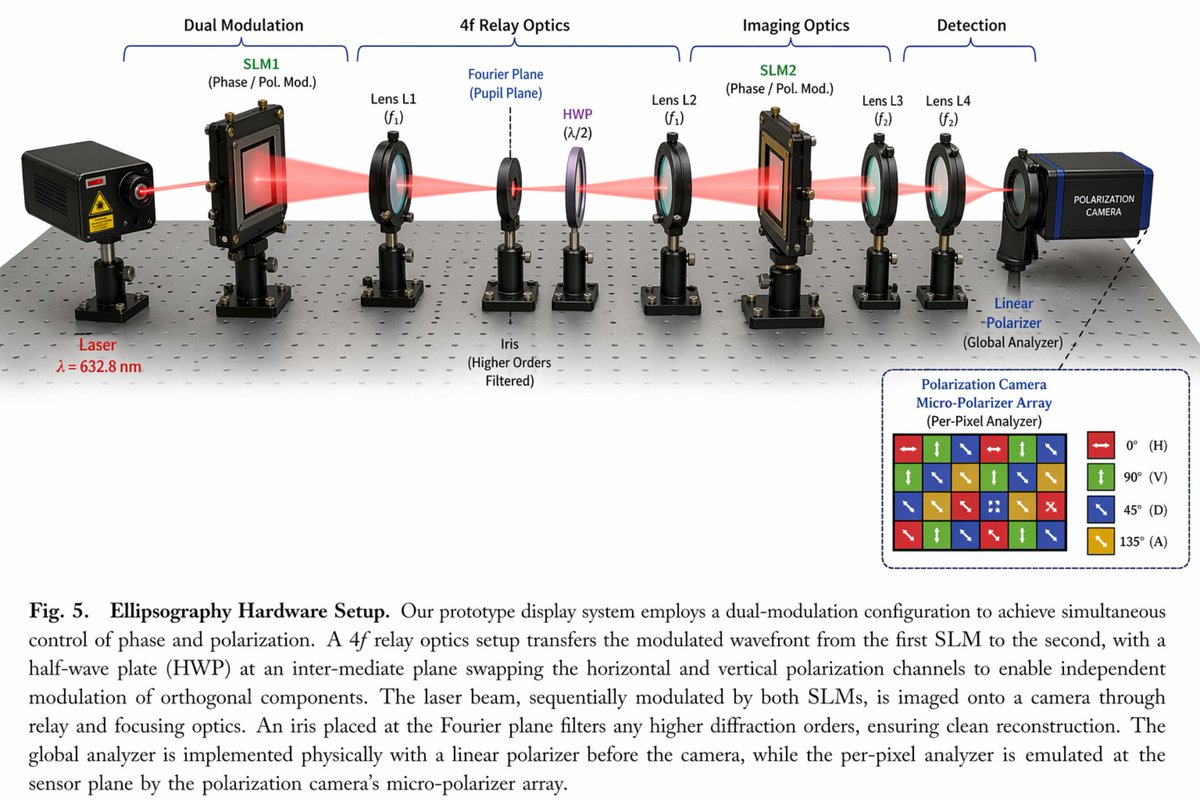
"main_scene": "3D render of an optical table with a red laser beam passing through 11 aligned optical components mounted on black posts.",
"top_brackets": [
{"label": "Dual Modulation", "span": "SLM1"},
{"label": "4f Relay Optics", "span": "Lens L1 to Lens L2"},
{"label": "Imaging Optics", "span": "SLM2 to Lens L4"},
{"label": "Detection", "span": "Camera"}
"optical_components_left_to_right": [
{"name": "Laser", "labels": ["Laser", "λ = {argument name=\"laser wavelength\" default=\"632.8 nm\"}"]},
{"name": "SLM1", "labels": ["SLM1", "(Phase / Pol. Mod.)"]},
{"name": "Lens L1", "labels": ["Lens L1", "(f1)"]},
{"name": "Iris", "labels": ["Fourier Plane", "(Pupil Plane)", "Iris", "(Higher Orders Filtered)"]},
{"name": "HWP", "labels": ["HWP", "(λ/2)"]},
{"name": "Lens L2", "labels": ["Lens L2", "(f1)"]},
{"name": "SLM2", "labels": ["SLM2", "(Phase / Pol. Mod.)"]},
{"name": "Lens L3", "labels": ["Lens L3", "(f2)"]},
{"name": "Lens L4", "labels": ["Lens L4", "(f2)"]},
{"name": "Linear Polarizer", "labels": ["Linear", "-Polarizer", "(Global Analyzer)"]},
{"name": "Polarization Camera", "labels": ["POLARIZATION CAMERA"]}
"inset_box": {
"position": "bottom right",
"title": "Polarization Camera Micro-Polarizer Array (Per-Pixel Analyzer)",
"grid": "4x4 grid of colored squares with directional arrows",
"legend_count": 4,
"legend_items": [
"Red square, horizontal arrow, 0° (H)",
"Green square, vertical arrow, 90° (V)",
"Blue square, diagonal arrow, 45° (D)",
"Yellow square, diagonal arrow, 135° (A)"
"bottom_caption": {
"figure_prefix": "{argument name=\"figure number\" default=\"Fig. 5.\"}",
"title": "{argument name=\"system name\" default=\"Ellipsography Hardware Setup.\"}",
"text": "Paragraph of scientific text explaining the dual-modulation configuration, 4f relay optics, and polarization camera."

{
  "type": "scientific hardware diagram",
  "layout": {
    "main_scene": "3D render of an optical table with a red laser beam passing through 11 aligned optical components mounted on black posts.",
    "top_brackets": [
      {"label": "Dual Modulation", "span": "SLM1"},
      {"label": "4f Relay Optics", "span": "Lens L1 to Lens L2"},
      {"label": "Imaging Optics", "span": "SLM2 to Lens L4"},
      {"label": "Detection", "span": "Camera"}
    ],
    "optical_components_left_to_right": [
      {"name": "Laser", "labels": ["Laser", "λ = {argument name=\"laser wavelength\" default=\"632.8 nm\"}"]},
      {"name": "SLM1", "labels": ["SLM1", "(Phase / Pol. Mod.)"]},
      {"name": "Lens L1", "labels": ["Lens L1", "(f1)"]},
      {"name": "Iris", "labels": ["Fourier Plane", "(Pupil Plane)", "Iris", "(Higher Orders Filtered)"]},
      {"name": "HWP", "labels": ["HWP", "(λ/2)"]},
      {"name": "Lens L2", "labels": ["Lens L2", "(f1)"]},
      {"name": "SLM2", "labels": ["SLM2", "(Phase / Pol. Mod.)"]},
      {"name": "Lens L3", "labels": ["Lens L3", "(f2)"]},
      {"name": "Lens L4", "labels": ["Lens L4", "(f2)"]},
      {"name": "Linear Polarizer", "labels": ["Linear", "-Polarizer", "(Global Analyzer)"]},
      {"name": "Polarization Camera", "labels": ["POLARIZATION CAMERA"]}
    ],
    "inset_box": {
      "position": "bottom right",
      "title": "Polarization Camera Micro-Polarizer Array (Per-Pixel Analyzer)",
      "grid": "4x4 grid of colored squares with directional arrows",
      "legend_count": 4,
      "legend_items": [
        "Red square, horizontal arrow, 0° (H)",
        "Green square, vertical arrow, 90° (V)",
        "Blue square, diagonal arrow, 45° (D)",
        "Yellow square, diagonal arrow, 135° (A)"
      ]
    },
    "bottom_caption": {
      "figure_prefix": "{argument name=\"figure number\" default=\"Fig. 5.\"}",
      "title": "{argument name=\"system name\" default=\"Ellipsography Hardware Setup.\"}",
      "text": "Paragraph of scientific text explaining the dual-modulation configuration, 4f relay optics, and polarization camera."
    }
  }
}
💡 提示词说明:本卡片提供高精度的 AIGC 生图咒语,点击下方 “Copy Prompt” 按钮即可一键复制原始英文提示词使用。
🔮 画面意境解析 (Prompt Translation)
AI 智能生成的艺术绘图提示词《例81 – 写实摄影风格图》,呈现宏大唯美的视觉质感。
🧩 结构化咒语拆解 (Structure Breakdown)
- 主体 (Subject): 根据 Prompt 自动生成画面主体
- 环境与背景 (Environment): 根据 Prompt 自动构筑光影背景
- 画风与光效 (Style & Light): 写实 / 3D / 插画艺术风格
🛠️ 避坑与参数建议 (Parameters & Tips)
推荐使用 Midjourney v6.0 或 Flux 1.0 模型生成,建议参数 –ar 9:16 –v 6.0
❓ 常见问题解答(FAQ)
这张图适合什么类型的科研论文?
适合偏振成像、椭偏测量、光学调制与成像系统等方向的论文配图。它强调双调制结构、4f中继与偏振相机的整体链路,便于读者快速理解实验装置。
图中的4f relay optics起什么作用?
4f中继光学用于在空间上转接与重建光场,帮助系统在SLM与后续成像模块之间实现更稳定的传递与滤波,是这类光学实验中常见的关键结构。
微偏振阵列插图说明了什么?
它说明偏振相机可通过像素级微偏振片阵列分别采集0°、45°、90°和135°四个方向的偏振信息,从而实现更细粒度的偏振分析。
🔬 语宙深潜追问 · 进阶实操拆解
双调制偏振成像图怎么避免画错器件关系?
先按光路顺序列出器件链路,再明确每个模块的输入输出和偏振状态变化。生成时要求“示意图、工程图、箭头标注、模块分层”,能减少器件串联关系被AI乱改。
论文配图如何兼顾美观和可复现?
优先保证拓扑正确、标注完整、比例一致,再追求视觉统一。最好把关键参数、光路方向、坐标系和插图说明写进提示词,避免只好看但无法复现。
🗳️ 读者观点微投票 · 您的实战立场是?
科研硬件示意图,AI最难的是结构还是标注?


